
White paper
Families as the care team: following a surgery from pre-op to discharge
Titan.Care · October 2026 · A case study of one family, with how each part works
1. Summary
In October 2026 a family in Chicago used Titan.Care through a parent's robotic hiatal hernia repair. A daughter posted updates from the waiting room; relatives in other cities followed one live page instead of calling; from the second day every new update reached the family's phones and, for relatives without the app, their inboxes. Before discharge she asked whether Titan.Care could help with what to ask the team. Within the hour it produced 46 questions built from her mother's own medicines, laboratory results and the hospital's charting, each with the guideline it comes from.
Asked afterwards whether Titan.Care had really helped, she answered: “Yes it did.” This paper sets out what happened, how each part works, what it does and does not claim, and what it means for families, for hospitals, and for partners.
2. The problem: the family is the care team, without the tools
An estimated 63 million Americans, about one adult in four, provided unpaid care to a family member or friend in 2025.[1] Around a surgery that care is concentrated into a few days: getting a parent ready, sitting in the waiting room, keeping relatives informed, and taking home instructions that the rest of recovery depends on.
The handoff home is where things go wrong. In a landmark analysis of Medicare claims, about one patient in five was readmitted to hospital within 30 days of discharge.[2] AHRQ's Re-Engineered Discharge (Project RED), which reconciles medicines, books the follow-up before the patient leaves and checks understanding with teach-back, reduced hospital use after discharge by about 30 percent in its randomized trial.[3] The elements that work are known. What families lack is a way to carry them out together, in the moment, from a phone.
- Updates from the waiting room travel by phone call and group text, to whoever happens to be on the thread.
- Relatives without the right app, or the right login, are left out or have to keep asking.
- The questions that matter most at discharge (which home medicines restart, which symptoms mean the ER) are the ones nobody thinks of while packing a bag.
- What the team said at the bedside is written on a scrap of paper, or nowhere.
3. What happened
The timeline below is the family's, as it happened. The screens in this paper show our demo family, the Riveras, so that no real name or record appears.
Before the day
The procedure arrived from the hospital's patient portal, and the family used the preparation page to write down what the surgeon's office said, including when to stop a medicine.
9:41 AM, surgery day
One tap on In surgery started a live timer on the family page.
Midday
Three short voice notes from the waiting room. Relatives in other cities followed the same page rather than calling.
1:02 PM
“She's out and doing okay.” The whole family read it at the same moment, after 3 hours 20 minutes in surgery.
Next morning
The leak check (an upper GI study) came back clear, posted straight after the radiologist spoke to the family.
Next afternoon
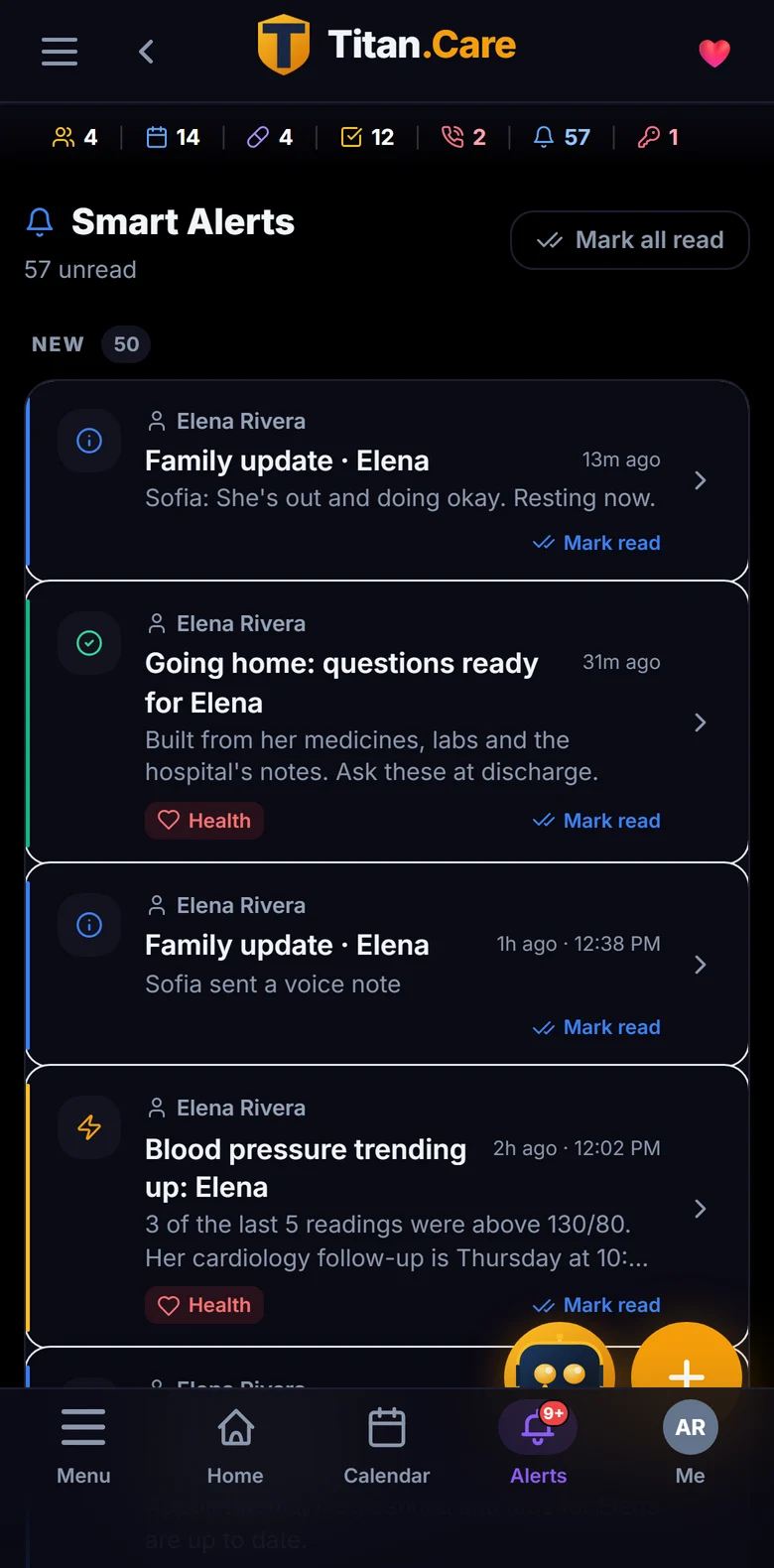
With notifications now live, a new update reached every phone in the care circle, and relatives without the app by email.
Before discharge
“Can Titan help with what to ask at discharge time?” Within the hour, 46 questions built from her mother's record, kept in her chart with the surgery.
4. How it works
4.1 Getting ready
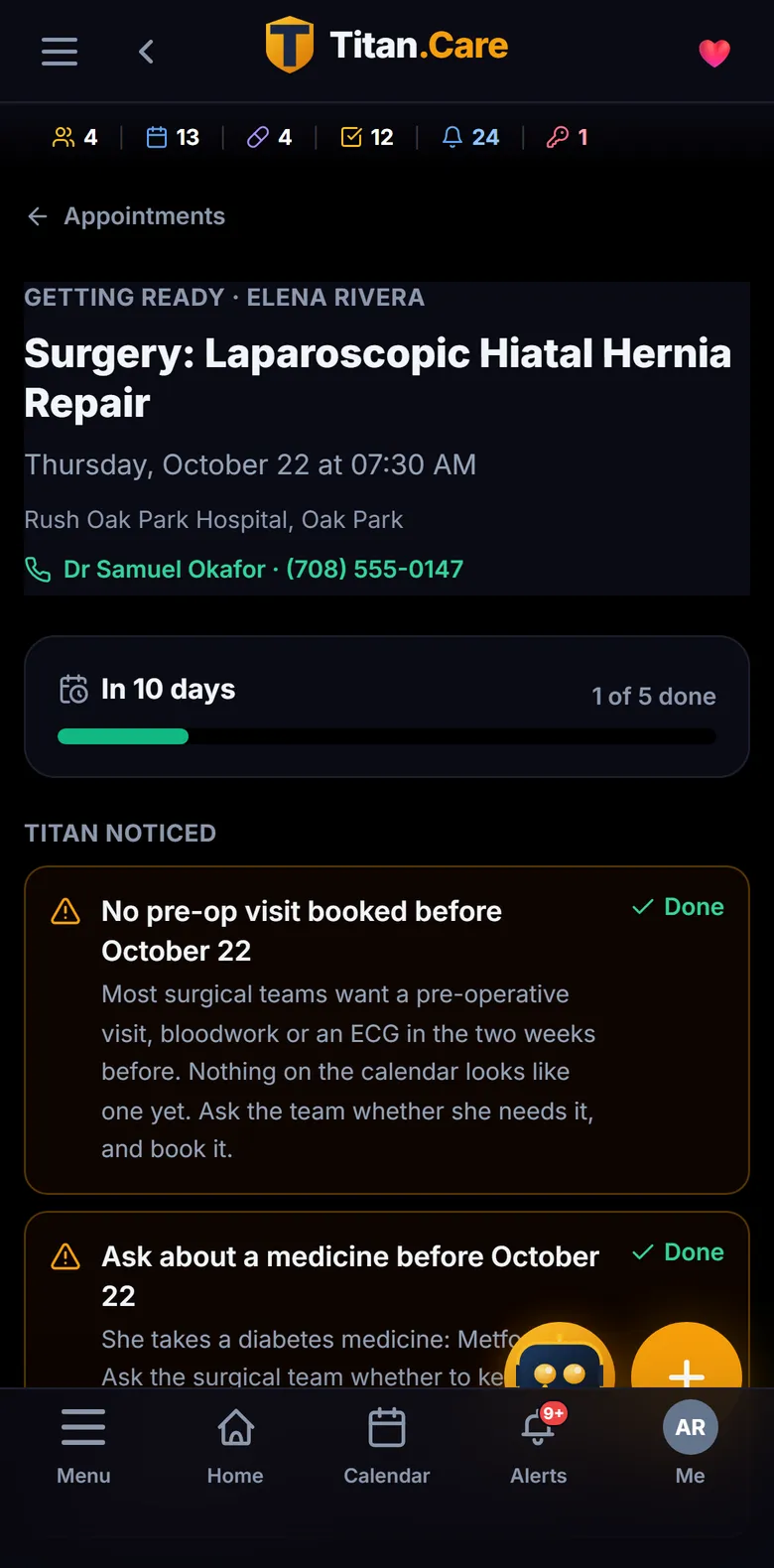
When a procedure lands from a hospital's MyChart, Titan.Care opens a preparation page for it: what it noticed (a blood thinner or diabetes medicine to ask about, no pre-operative visit on the calendar), the jobs the family needs to do, and whose name is against each one. The bar fills as work is done, not as the date approaches.
4.2 Family Updates from the waiting room
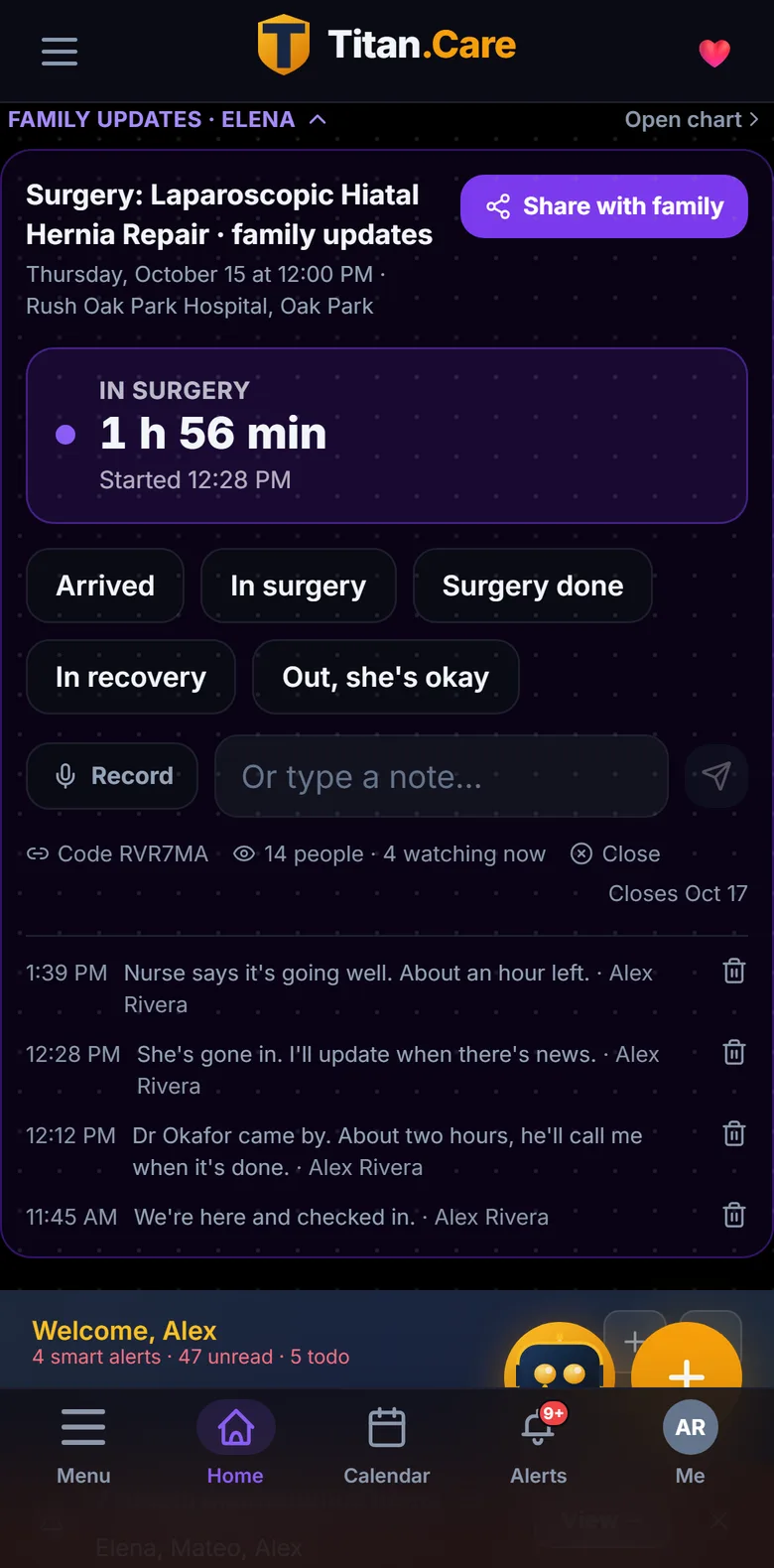
On the day, one person taps Arrived, In surgery, Surgery done, In recovery, and Out. A surgery timer starts that everyone can watch. A typed note or a voice note takes seconds; voice is kept as audio because a parent's relatives may not all share a language, and a recording has nothing to get wrong.
4.3 Everyone hears it, with or without the app
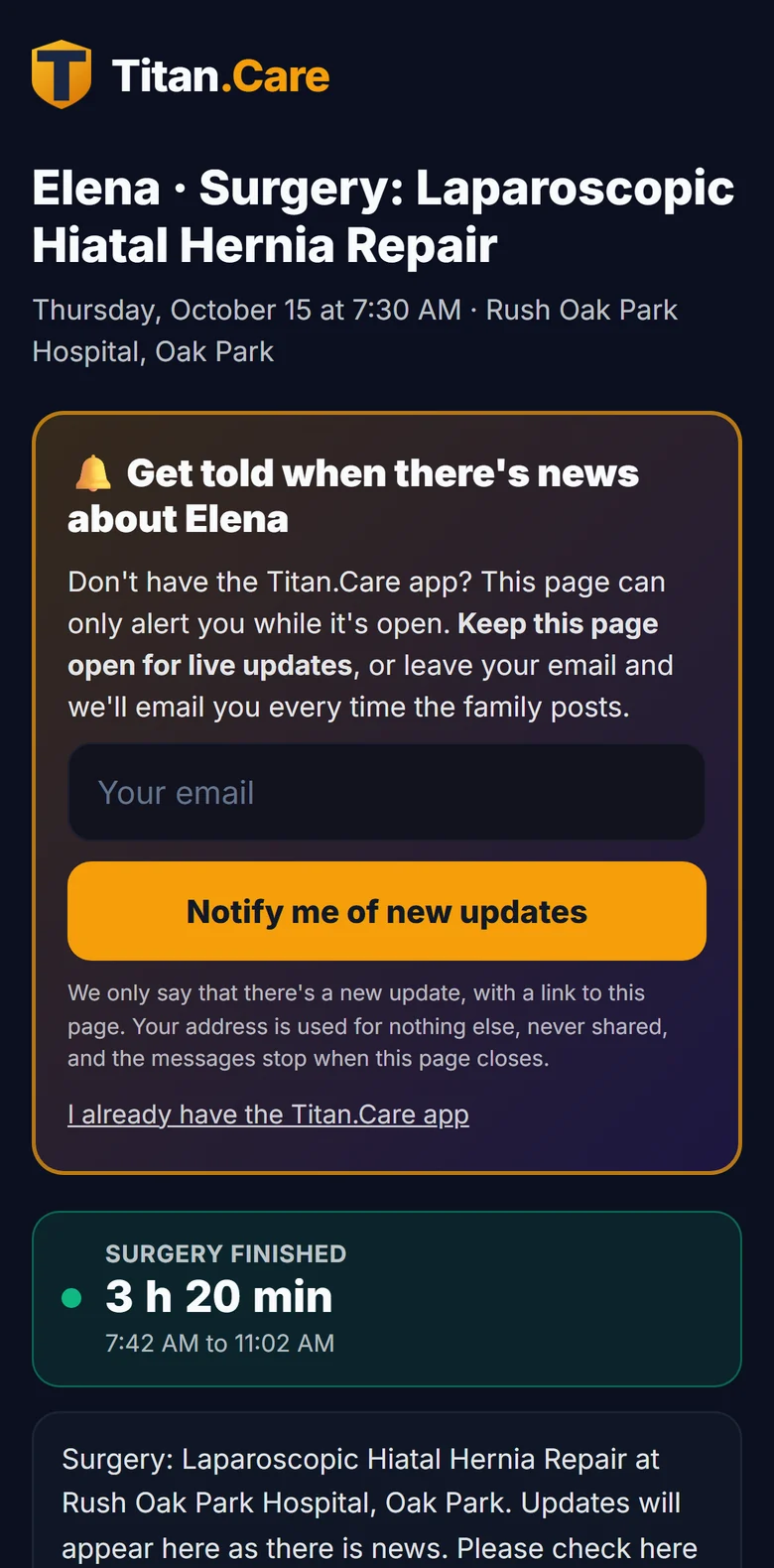
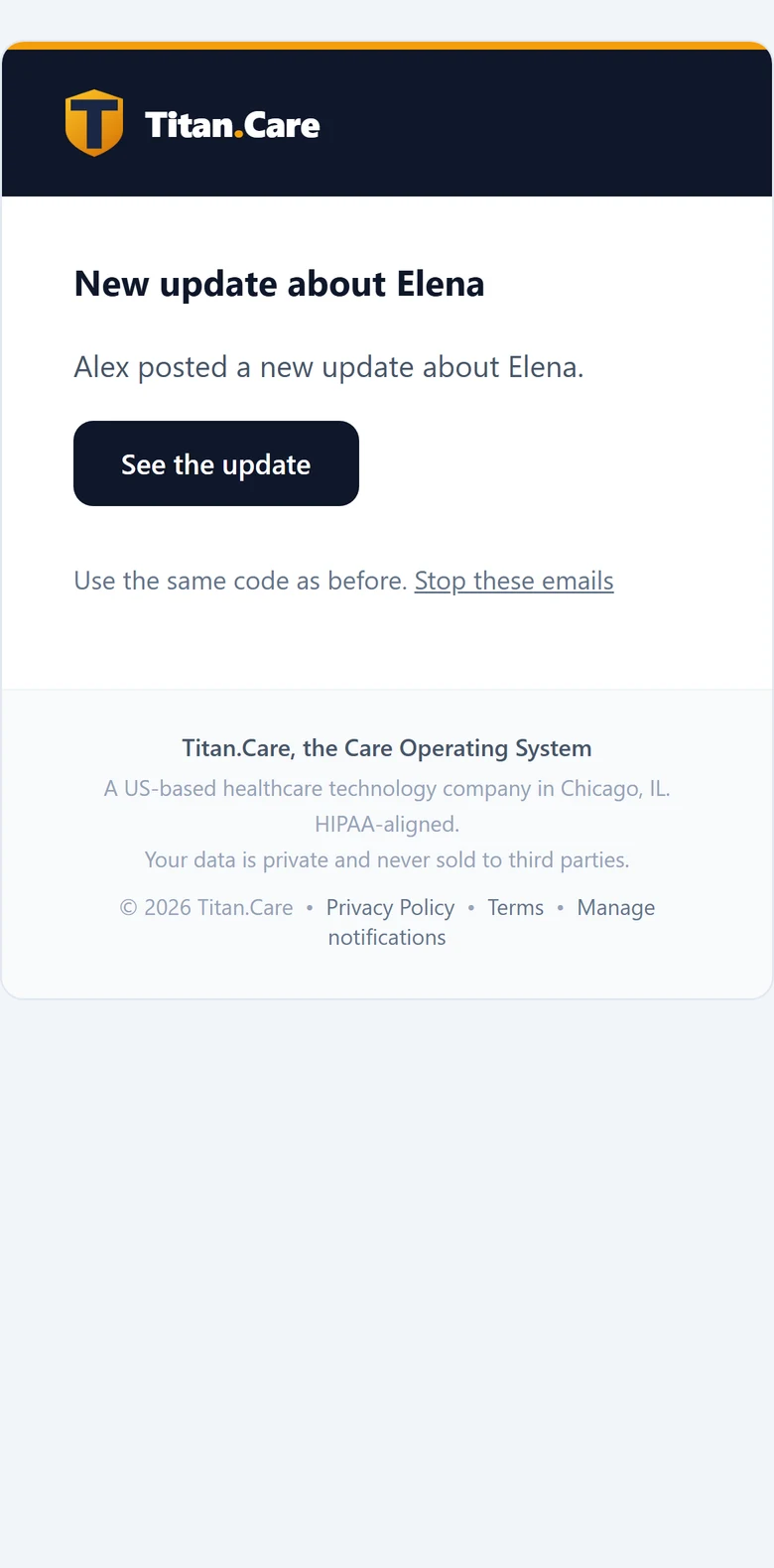
Every post reaches everyone who can see the patient's record, in the app, within seconds: never the person who posted, and once for a burst of quick taps rather than three times. Relatives without the app open one link with a six-character code; the page updates itself, and they can leave an email address to be told about every new update. The email says only that there is news, with a link back: never the update itself, never the code.
4.4 Going home, with the right questions
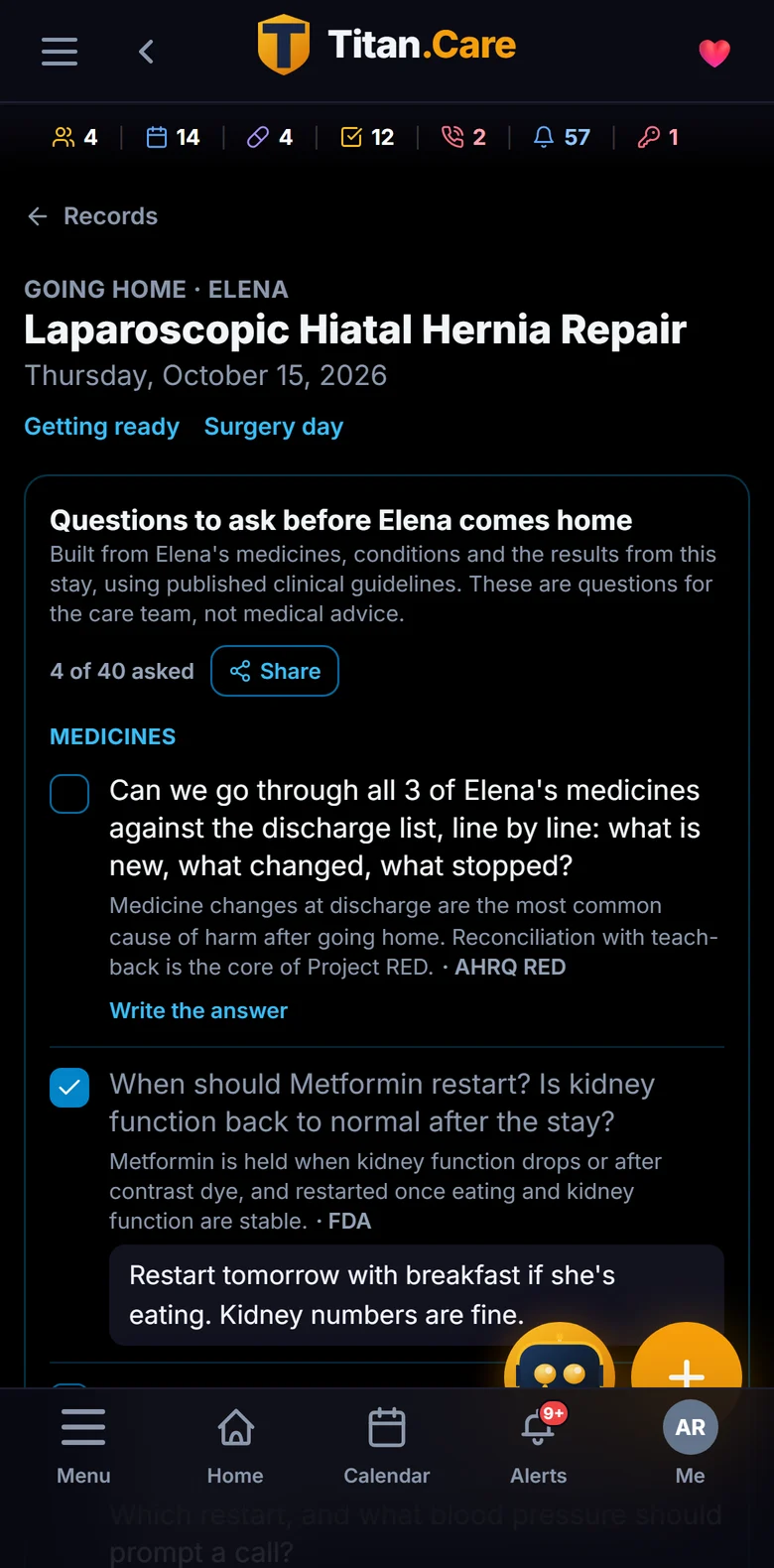
Before discharge Titan.Care builds the questions to ask from the patient's own record: each medicine by name and strength, the abnormal results from this stay with their values and dates, what the hospital charted (a slow heart rate on a beta blocker, a peak blood pressure, oxygen, a hearing difficulty, confusion after anesthesia), the procedure, conditions and age. Each question carries one line on why it matters and its source: AHRQ Project RED, the ADA Standards of Care, FDA labeling, the CDC opioid guideline, CHEST, the AGS Beers Criteria, SAGES, KDIGO, ISMP.[3][4][5] The family ticks each one off and writes the answer under it; the answers stay in the patient's chart with the surgery.
The rules are deterministic. No model writes these questions, so the same record always gives the same list, every line can be traced to its source, and nothing is ever phrased as advice. Titan.Care does not tell a family what to take or do; it makes sure the team is asked.
4.5 Everything Titan.Care tells the family
The same notification system carries the rest of a family's care: appointment reminders with who is driving, new lab results as they arrive from each hospital's MyChart, records synced, medication doses, and the discharge questions when a stay ends.
5. Privacy and safety
- Only people who can already see the patient's record are notified, re-checked at the moment of sending; a lapsed or revoked grant gets nothing.
- Private mode replaces what crosses the lock screen with “You have a health update”; the details wait inside the app.
- The family page needs a link and a code, closes by itself after the stay, and emails never carry the update or the code.
- Sensitive categories (mental health, substance use, reproductive health and others) and private medicines are filtered out of the discharge questions for anyone not permitted to see them.
- Hosted only in the United States, encrypted in transit and at rest, with a signed Business Associate Agreement. Data is never sold, shared or used for advertising.
6. For families
The person in the waiting room has one job that day: being there. Titan.Care lets them post once and have the whole family know, including the relatives who will never install an app. And when the team comes to discuss going home, the right questions are already written, from the patient's own record, with room for the answers.
7. For hospitals and care teams
The elements of a good discharge are well established: medicine reconciliation, a booked follow-up, pending results owned by someone, warning signs understood, and teach-back.[3] Titan.Care puts those elements in the family's hands, personalised to the patient, and records the answers. Updates reach relatives without calls to the waiting room, the family arrives at discharge prepared, and there is a written record of what was said. Titan.Care connects through the patient's own MyChart, so there is nothing to integrate to start.
8. For partners and investors
This family did not need persuading. They used Titan.Care because the day was hard and it made the day easier, and when they hit a gap (what to ask at discharge) the product filled it within the hour, from their own data. Surgery is one of the moments every family meets; the same record, circle and notifications carry the rest of the year: appointments, medicines, results, children's activities, and a parent's next stay.
9. Method and limits
This is a case study of one family, not a clinical study. The account comes from the family's own posts and messages during the stay; the quote is word for word and shared anonymously with permission. Times are as posted. Notifications and emails shipped on the second day of the stay, and this paper does not claim they were used on the first. Every screenshot shows the fictional Rivera family, so no real name, photo or record appears. Titan.Care does not provide medical advice, diagnosis or treatment.
10. References
- [1] AARP and National Alliance for Caregiving. Caregiving in the US 2025. Washington, DC; 2025.
- [2] Jencks SF, Williams MV, Coleman EA. Rehospitalizations among patients in the Medicare fee-for-service program. N Engl J Med. 2009;360:1418-1428.
- [3] Jack BW, Chetty VK, Anthony D, et al. A reengineered hospital discharge program to decrease rehospitalization: a randomized trial. Ann Intern Med. 2009;150:178-187. And the AHRQ Re-Engineered Discharge (RED) Toolkit.
- [4] American Diabetes Association. Standards of Care in Diabetes: Diabetes Care in the Hospital. Diabetes Care.
- [5] American Geriatrics Society Beers Criteria Update Expert Panel. American Geriatrics Society 2023 Updated AGS Beers Criteria. J Am Geriatr Soc. 2023.